
Takes about two minutes
You do this from inside your own Xero file and it takes about two minutes. Xero only lets someone who can manage users add an advisor, so it has to come from your end rather than ours. If the option is not there, that is usually what it means, and it is worth ringing rather than hunting.

Doing it yourself, screen by screen
These are the current screens. Xero moves things about from time to time, so if a menu is not where this says, the search box at the top of Xero will find Users faster than hunting will.
Open Settings
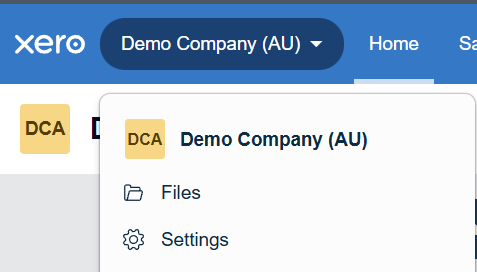
Click your business name in the top left corner of the blue bar, then Settings. That is the whole menu of everything about the organisation.
Watch out: make sure the business name showing is the right one. If you have more than one entity in Xero, it is easy to add somebody to the wrong company and wonder why they cannot see anything.
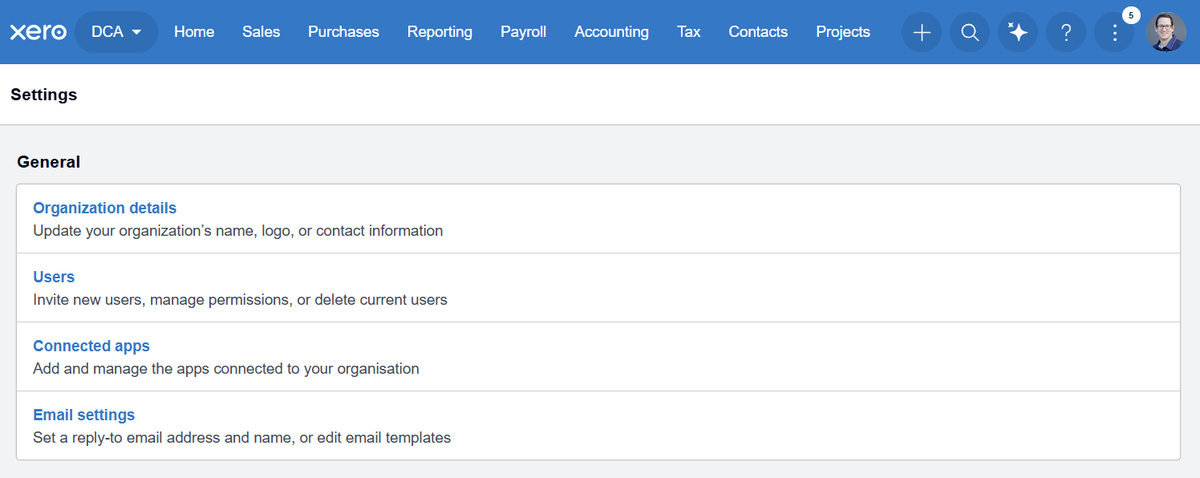
Under General, click Users
It is the second item, described as Invite new users, manage permissions, or delete current users. That is the one.
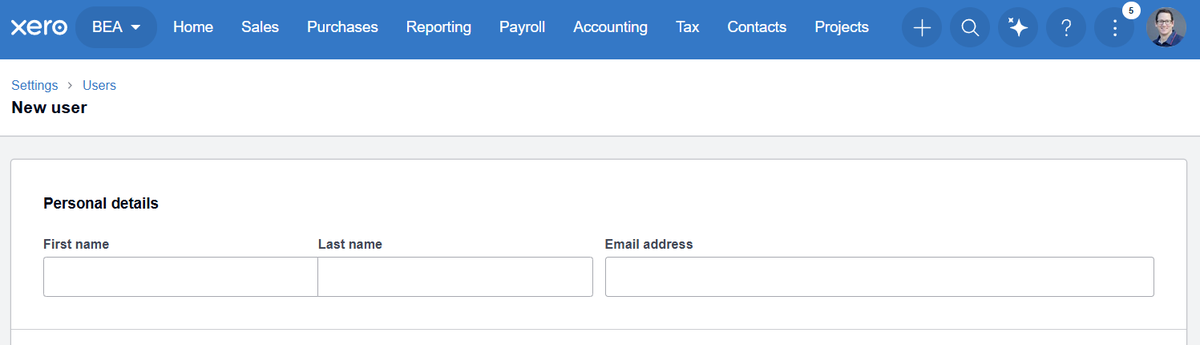
Click New user
The button sits at the top right and is labelled New user. Older guides call it Invite a user. You will see the people who already have access. Ours may already be on the list from a previous year, in which case there is nothing to do.

Put in the name and email
First name, last name and email address. Use the exact address we give you, because the invitation goes to that inbox and nowhere else.
Watch out: a typo in the email is the single most common reason an invite never turns up. It does not bounce back to you in any obvious way. If we have not been in touch within a day, check what you typed before assuming Xero is broken.
Choose the role, then Send invite
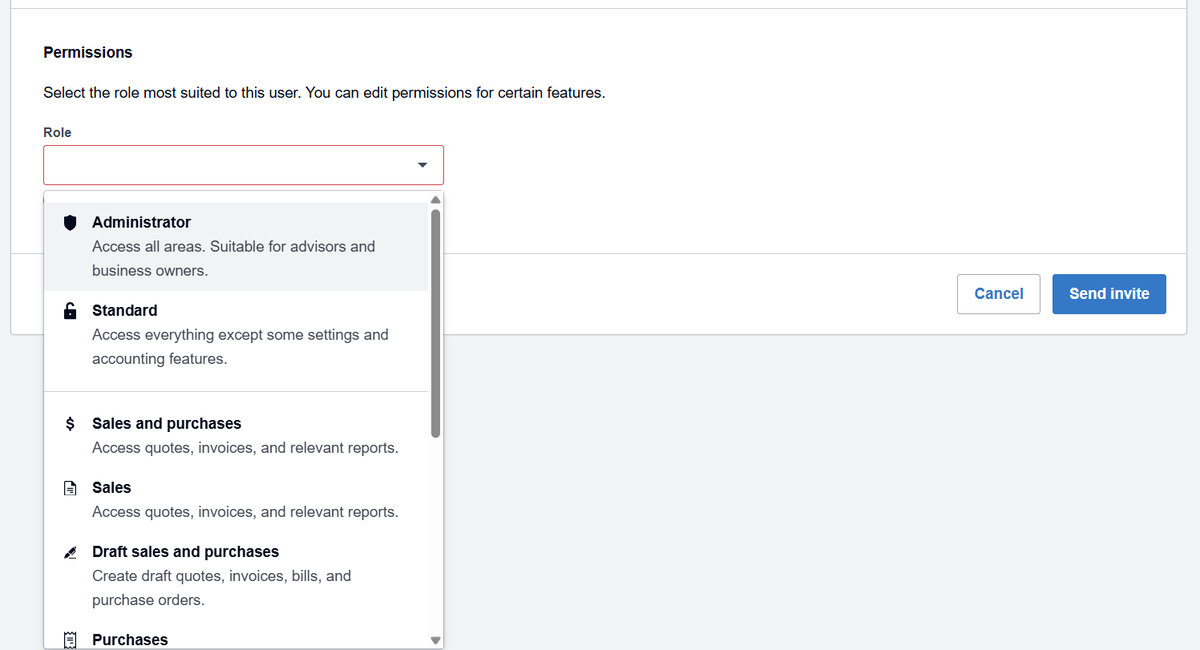
Under Permissions there is a Role dropdown. Choose Administrator, which Xero itself describes as access to all areas and suitable for advisors and business owners. Then click Send invite.
Watch out, and this one has changed: plenty of guides online still tell you to pick a role called Adviser. There is no longer an Adviser option in that list. It is Administrator or Standard now, and Standard cannot see the settings and accounting features we need. If you pick Standard we will be back to you asking for it to be changed.
What we can and cannot see
Fair question, and worth answering plainly.
We can see your accounts, your transactions, your invoices and bills, your payroll and your reports. That is the point: it is what lets us do the work without asking you to export things and email them about.
We cannot move money. Xero access is not bank access. We can see what has gone in and out because the bank feed brings it in, but nothing in Xero lets anybody pay anyone from your account.
You can remove us any time, from the same Users screen, without asking anybody. It takes about ten seconds.
If you would rather we saw less, say so. There are narrower options and we would rather have the conversation than have you quietly uncomfortable about it.
If it does not go to plan
There is no Users option in my Settings.
You are signed in as a user who cannot manage users. Whoever set the Xero account up can do it, or can give you the permission. If nobody knows who that is, ring us and we will work it out.
I sent it and you say you have not got it.
Nearly always the email address. Go back into Users and look at what is actually saved against the invite. Second most likely is that it went to a spam folder at our end, which we can check.
I picked the wrong role.
No harm done. Open Users, click the person, change the role and save. You do not need to delete them and start again.
I have three companies in Xero.
Access is per organisation, so it has to be done once for each one. Tell us which entities we should have and we will confirm what came through.
Can I just give you my login?
Please do not. It breaches Xero’s terms, it means everything we do looks like you did it, and it leaves you no way to remove access except changing your password. The invitation exists precisely so nobody has to share a password.
Stuck on it?
Ring the office and we will stay on the phone while you do it. The invitation has to come from your screen because it is your file, but there is no reason to work it out on your own.