If you do a $2,000 job for the local footy club and don’t charge them, you can’t claim $2,000 as a donation. The ATO is clear that giving your time or your labour is not a deductible gift. What you can claim is what the job actually cost you, and most of that is already in your books.
That surprises a lot of people, because it feels like a donation. It is a generous thing to do. The tax system just doesn’t measure it at the price you would have charged.
If you only ever give cash to a registered charity, this post isn’t about you, and our guide to claiming donations covers it. This one is for the business owner who gives away work: the signwriter who does the club’s scoreboard, the sparky who wires the hall, the landscaper who tidies the kinder garden for nothing.
Why the $2,000 isn’t a donation
A tax deductible gift has to be a transfer of money or property. Your work is neither. The ATO puts it plainly: a donation of a service, including someone’s time, “is not tax deductible as no money or property is transferred”.
So there is no line on any return where the $2,000 you didn’t charge goes. And there is no need to find one, because the costs behind the job are already being claimed.
Say the job normally sells for $2,000 and costs you $900 to do.
| Item | Amount | How it’s treated |
|---|---|---|
| Your normal price | $2,000 | Not deductible. Nothing to claim. |
| Staff wages for the job | $600 | Already in your wages expense |
| Materials you bought for it | $300 | Already in your purchases |
| What it cost you | $900 | Already claimed. Don’t claim it twice. |
That last row is the one that matters. The wages went through payroll and the materials went through your bills, so the $900 is already a business expense. Writing it off again as a “donation” double counts it.
The ATO also says that where a business supports a charity through sponsorship or advertising, that is generally a business expense rather than a gift. Your name on the club’s sign, a thank you in the newsletter, being known as the business that helps out: that is the business reason for the costs.
Two traps worth knowing about
Most free jobs are simple. Two kinds are not.
Giving away stock off the shelf
Labour and materials bought for the job are fine. Finished goods out of your trading stock are different. If you give away stock outside the normal course of business, the law counts its market value as your income, as if you’d sold it.
If the club is a deductible gift recipient (DGR), you get a matching deduction and it nets to nil. If it isn’t, you have the income and no deduction. A retailer who hands the junior footy club a carton of stock can end up paying tax on a sale that never happened.
Getting something back
If the club gives you nothing in return, there’s no GST on the free job. The ATO’s own example says so.
If they do give you something, like your logo on the scoreboard you painted, naming rights or an ad in the program, the ATO treats that as a contra deal. Where you’re both registered for GST, you’re each making a taxable sale to the other at market value. That’s worth five minutes with us before you agree to it, not after the BAS is lodged.
Not every club is a DGR. Plenty of not-for-profits can’t receive deductible gifts at all. You can check any organisation on ABN Lookup under “Deductible gift recipient status”. For donated work it makes no difference, because services aren’t a gift either way. For donated stock or cash, it decides everything.
How to record it: a $0 invoice
Don’t leave the job off the books, and don’t raise a $2,000 invoice and write it off as a bad debt later. The first loses the record. The second puts $2,000 of income on the books, then a write-off for a debt you chose to forgive, which isn’t really a bad debt at all.
Raise the invoice at your normal price, then take a 100% discount so it comes to $0. You and the club both get a record of what was given and what it was worth, and nothing artificial goes through your accounts.
Here is how it looks in Xero, using Xero’s demo company.
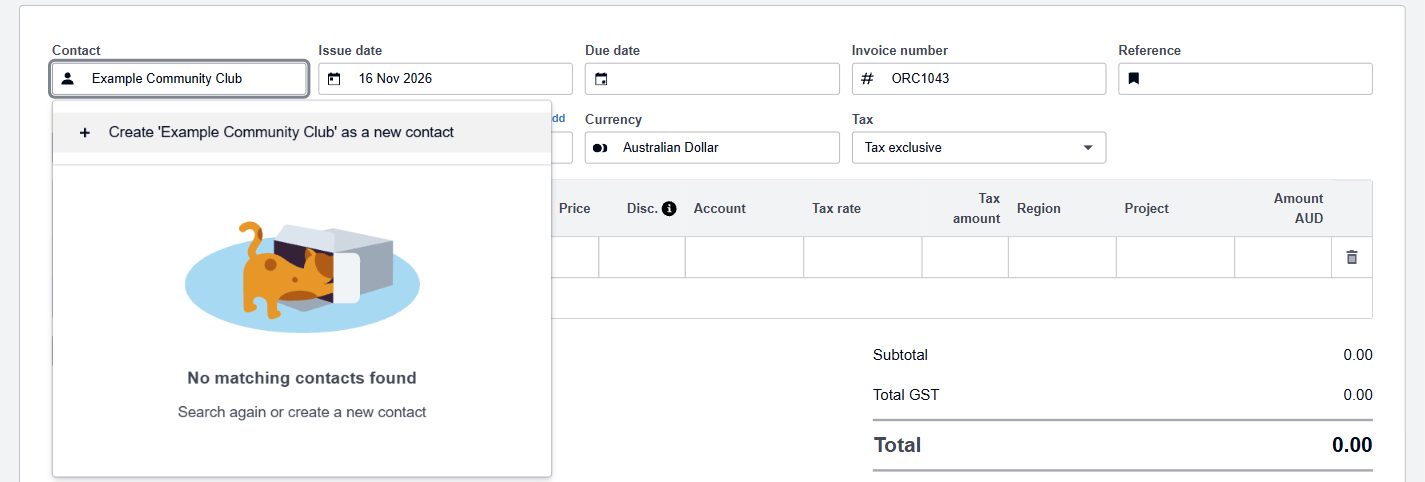
1. Start a new invoice to the club
Go to Sales, then Invoices, then New invoice, and pick the club as the contact. If you’ve never invoiced them, Xero adds them as you type. Our Xero invoicing guide covers the basics.
2. Add the job at its normal price, with a 100% discount
Describe the work, put in your normal price, and in the Disc. column type 100%, with the percent sign.
That sign matters. Without it, Xero reads the number as dollars: type 100 and you’ve taken $100 off a $2,000 job and sent the club a bill for $2,090. Xero says so if you hover over the little “i” beside the column heading.
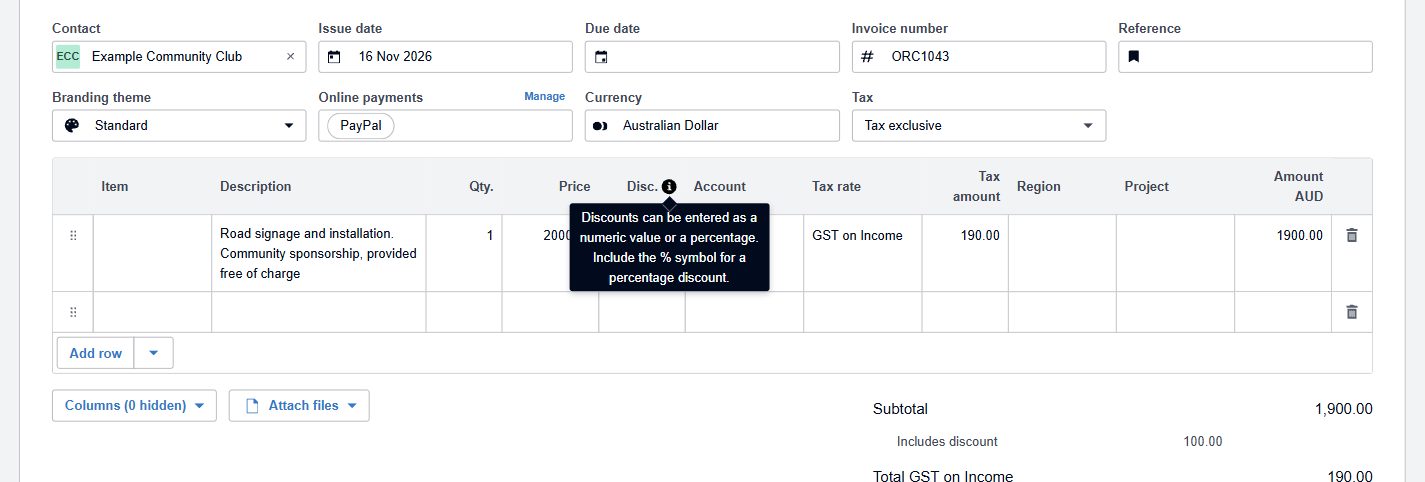
Write something in the description that says why, such as “Community sponsorship, provided free of charge”. It’s the line the club’s treasurer will read. Once the discount is right, Xero shows the full value as “Includes discount” and the total as $0.00.
3. Add a due date and approve it
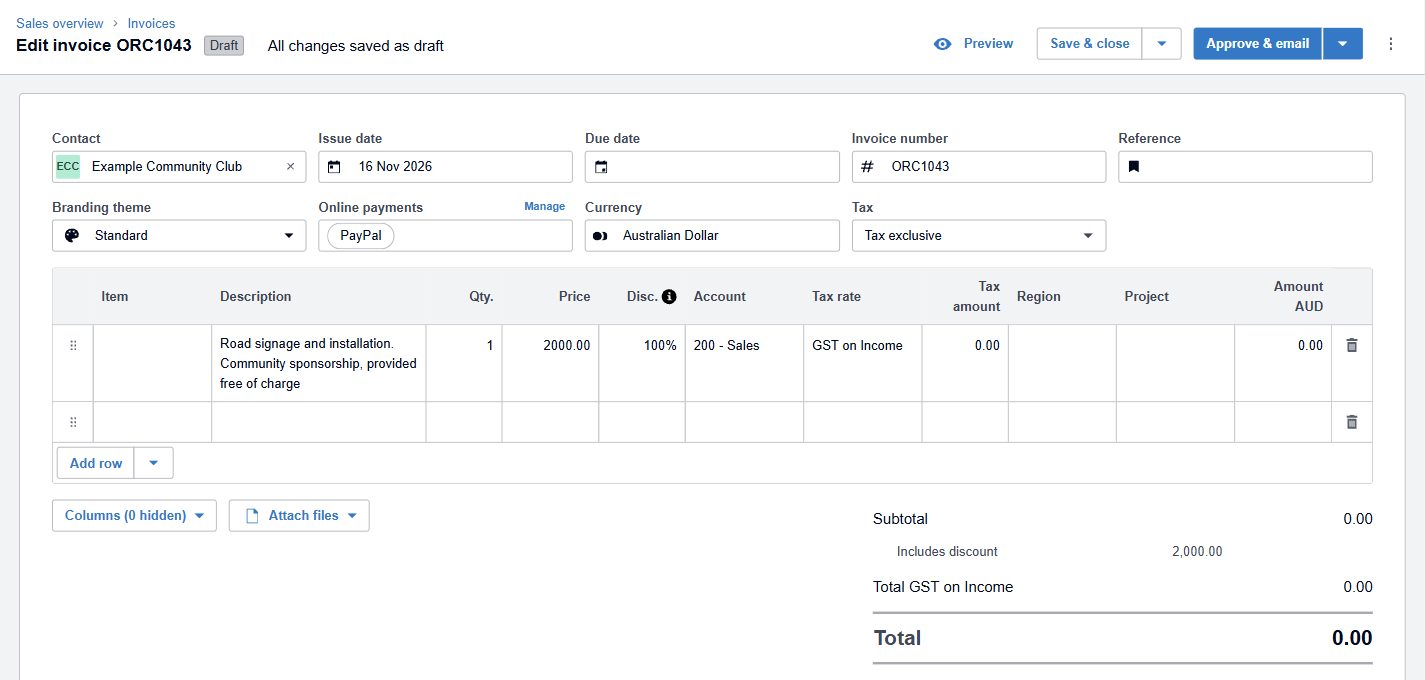
Xero won’t approve an invoice without a due date, even one for nothing. Use today’s date. Then approve it, or approve and email it to the club in one go.
A $0 invoice goes straight to Paid. There’s nothing to chase, nothing sitting in your debtors, and no bad debt to write off at the end of the year.
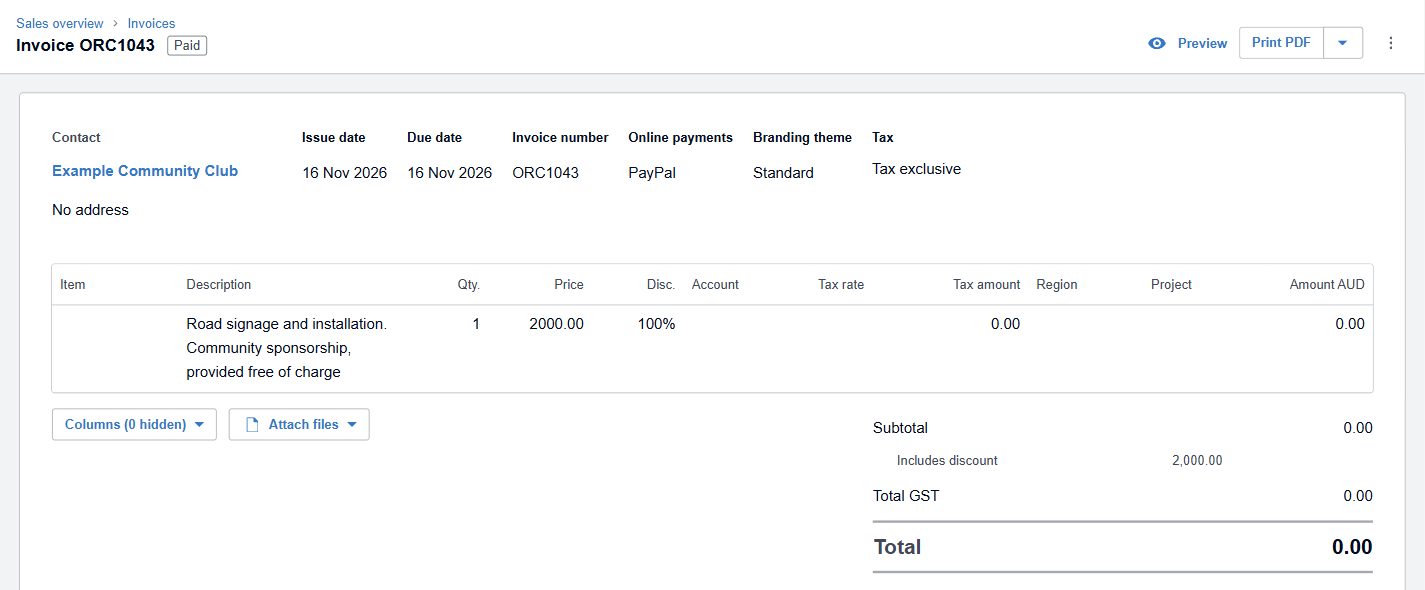
One Xero quirk. Once a line discounted by 100% is approved, Xero drops the account code and tax rate you picked, as you can see above. Xero has acknowledged it. Nothing is posted at $0, so it does no harm, but don’t be thrown when you open the invoice again and they’re blank.
Track what it really cost
The $0 invoice records the value. It doesn’t tell you what the job cost you. If you give away work regularly, set up a tracking category in Xero, something like “Community support”. It appears as its own column on bills and timesheets, the way “Region” does in the screenshots above. Tag the wages and materials for these jobs to it. At the end of the year you’ll know exactly what the business put back into the community, which is a good number to have, and a nice one to be able to tell people.
What to tell the club
Send them the $0 invoice. It gives their treasurer a record of the support and its value, which many clubs need for grant applications and annual reports.
If they ask for a donation receipt, tell them kindly that they shouldn’t issue one for work. A receipt for a “gift” of services isn’t something the ATO recognises, and it puts them in an awkward spot if they’re a DGR.
What we will do
For most free jobs the $0 invoice is all you need. If your business gives a lot away, or gives stock, or gets its name on something in return, we will:
- check whether the organisation is a DGR and whether that changes anything for you
- work out whether a logo, naming rights or advertising turns the job into a contra deal with GST on both sides
- set up the discount and a tracking category in your Xero so the next free job takes two minutes
- tell you the year’s total, so you know what your community support actually cost